


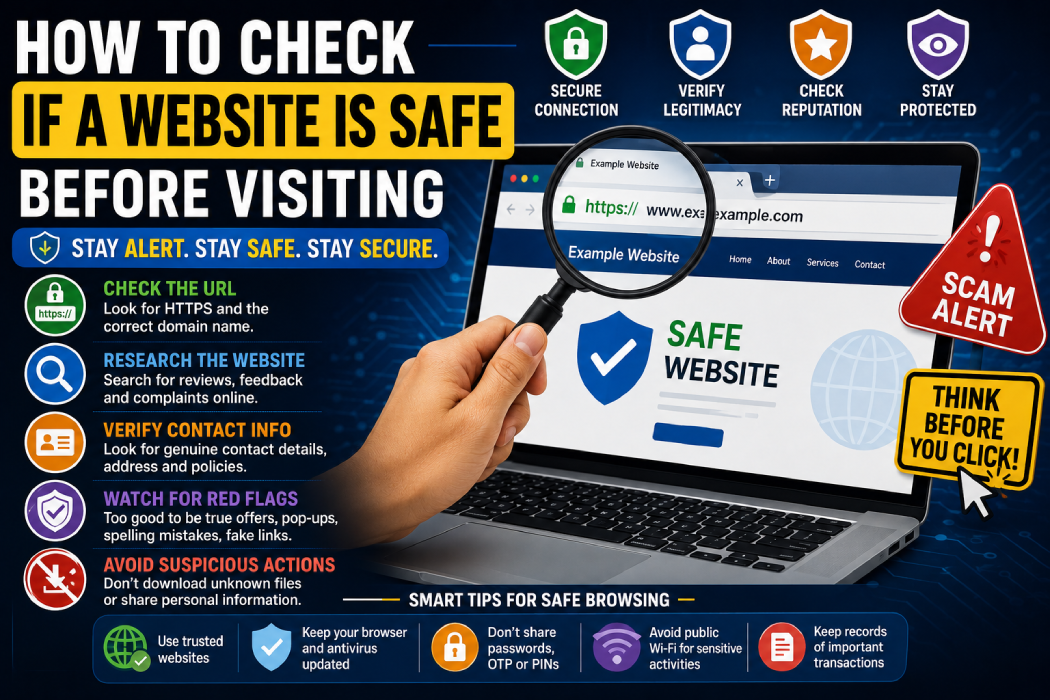
The internet gives us instant access to millions of websites for shopping, banking, education, entertainment, news, and work. But not every website is trustworthy or safe.
Some websites are created to steal personal information, spread malware, display fake offers, or trick users into making payments. A single click on a suspicious website can sometimes expose you to phishing attempts, fake downloads, or other online scams.
That’s why it’s important to know how to check whether a website is safe before entering personal information, downloading files, or making a payment.
In this guide, we’ll explain simple ways to identify suspicious websites and browse the internet more safely.
Why Website Safety Matters
Many online scams begin with a fake or malicious website.
Scammers can create websites that look surprisingly professional. They may copy the design of:
- Banks
- Shopping websites
- Government portals
- Social media platforms
- Courier companies
- Job portals
- Popular brands
The website may look genuine at first glance, but its real purpose could be to collect:
- Passwords
- Banking details
- Credit card information
- OTPs
- Personal documents
- Email addresses
- Mobile numbers
Some unsafe websites may also attempt to trick visitors into downloading harmful or unwanted software.
Learning a few basic website safety checks can help reduce these risks.
1. Check the Website URL Carefully
The first thing you should check is the website address.
Scammers often create URLs that look similar to legitimate websites.
For example, a fake website might use:
- Slight spelling changes
- Extra words
- Hyphens
- Unusual domain extensions
- Numbers instead of letters
A small difference in the URL can lead to a completely different website.
Before entering sensitive information, carefully read the domain name.
Example of What to Check
Look for:
- Misspelled brand names
- Extra characters
- Unusual words before or after the brand name
- Strange domain extensions
Don’t rely only on how the website looks. Always check the actual address in your browser.
2. Look for HTTPS — But Don’t Trust It Alone
Many secure websites use HTTPS in their URL.
You may also see a padlock icon in the browser.
HTTPS means that the connection between your browser and the website is encrypted.
However, there is an important point:
HTTPS does not automatically mean that a website is legitimate or trustworthy.
Scammers can also create websites that use HTTPS.
So consider HTTPS as a basic security feature, not proof that the website is genuine.
Always combine this check with other safety methods.
3. Check the Domain Name
The domain name is one of the most important things to verify.
For example, scammers may create websites with names that closely resemble popular brands.
Before logging in or making a payment:
- Read the domain name carefully
- Check spelling
- Look for extra words
- Avoid confusing URLs
- Verify the official website independently
A website may use a familiar company name in a subdomain or page title while the actual domain belongs to someone else.
Always identify the real main domain.
4. Be Careful With Links From SMS and WhatsApp
One of the easiest ways to reach a dangerous website is through a link sent in:
- SMS
- Telegram
- Social media messages
A message may claim:
“Your bank account will be blocked.”
“You have won a prize.”
“Your parcel is waiting.”
“Update your KYC immediately.”
The message often includes a link and creates urgency.
Instead of clicking the link, open the official website or mobile app manually.
For example, if you receive a suspicious bank message, open your bank’s official app rather than using the provided link.
5. Check for Spelling and Grammar Mistakes
Many fake websites contain obvious mistakes.
Look for:
- Poor grammar
- Incorrect spelling
- Strange sentences
- Poor translations
- Inconsistent information
One typo does not necessarily mean a website is fraudulent.
However, if the entire website contains multiple errors and suspicious claims, you should be cautious.
Professional organizations usually take greater care with important pages such as login, payment, and customer support sections.
6. Check the Website’s Contact Information
A legitimate business website should usually provide ways to contact the organization.
Look for:
- Official email address
- Customer support information
- Physical business address where appropriate
- Contact page
- Terms and conditions
- Privacy policy
- Return and refund policy for shopping websites
Be cautious if a website only provides:
- A random WhatsApp number
- A Gmail address for a large company
- No contact information
- A suspicious contact form
You can also search the business name independently to verify its online presence.
7. Search for Reviews and Complaints
Before trusting an unfamiliar website, search online for information about it.
Try searching:
Website name + reviews
Website name + scam
Website name + complaints
Look for independent discussions and reviews rather than relying only on testimonials displayed on the website itself.
Be careful with websites that show hundreds of perfect five-star reviews but have no independent online presence.
8. Check How Old the Website Is
A recently created website is not automatically fraudulent.
Many legitimate businesses launch new websites every day.
However, if a website is:
- Recently created
- Offering unrealistic discounts
- Has no online reputation
- Has no verifiable business information
then you should be extra cautious.
Website domain information can sometimes provide useful context about how long a domain has existed.
Use website age as one factor, not the only factor.
9. Watch Out for Too-Good-to-Be-True Offers
Scammers often use unrealistic offers to attract visitors.
Examples include:
- Expensive phones at 80% discounts
- Free gifts
- Guaranteed jobs
- Guaranteed investment returns
- Instant loans
- Huge cashback offers
- Luxury products at extremely low prices
Before accepting an offer, ask yourself:
Why is this company offering something much cheaper or easier than everyone else?
If the offer seems unrealistic, investigate before sharing information or making a payment.
10. Check the Website Design and Content
A fake website can sometimes be identified through inconsistencies.
Look for:
- Broken pages
- Missing images
- Copied content
- Strange layouts
- Incorrect company logos
- Outdated information
- Buttons that don’t work
However, modern scammers can create professional-looking websites.
Therefore:
A beautiful website is not proof that it is safe.
Always verify other information as well.
11. Check for Fake Pop-Ups
Some unsafe websites use alarming pop-ups.
For example:
“WARNING! Your phone is infected!”
“Virus detected! Download this app immediately!”
“Your device is at risk!”
These messages are often designed to create panic.
Don’t immediately download anything or call a phone number shown in the pop-up.
Close the suspicious page.
Avoid granting unnecessary browser permissions.
12. Be Careful Before Downloading Files
Unsafe websites may encourage visitors to download:
- APK files
- Unknown software
- Browser extensions
- Fake security tools
- Cracked applications
Before downloading anything:
- Verify the website
- Prefer official sources
- Check the publisher
- Avoid pirated software
- Don’t install unknown APK files
Downloading files from untrusted sources can create security and privacy risks.
13. Check Website Permissions
Modern browsers may ask websites for permissions such as:
- Notifications
- Camera access
- Microphone access
- Location
- Clipboard access
Only grant permissions when they are genuinely necessary.
For example, a simple news website probably doesn’t need access to your microphone.
If a website requests unnecessary permissions, deny them.
14. Use a Website Safety Checker
Website reputation and security tools can help identify suspicious links.
These tools may scan URLs for:
- Malware
- Phishing attempts
- Suspicious activity
- Known security threats
However, no single tool can guarantee that every website is completely safe.
Use security checkers as an additional layer of protection.
If a website still looks suspicious, avoid entering sensitive information.
15. Check Google Search Results Carefully
When searching for a company or service, scammers may create fake pages designed to appear similar to official websites.
Before clicking:
- Check the domain name
- Read the page title carefully
- Don’t automatically trust advertisements
- Look for the official source
For important services such as banking or government portals, consider typing the official website address manually or using a trusted bookmark.
16. Never Enter Sensitive Information Without Verification
Before entering personal or financial information, pause and verify the website.
Be especially careful with:
- Bank account details
- Credit/debit card details
- CVV
- OTP
- Passwords
- UPI PIN
- Aadhaar details
- PAN details
- Personal documents
Never share sensitive information simply because a website asks for it.
Ask yourself:
Is this information genuinely required?
Have I independently verified this website?
Did I arrive here through a suspicious link?
Quick Website Safety Checklist
Before trusting an unfamiliar website, check:
✅ Is the domain name spelled correctly?
✅ Does the URL look normal?
✅ Does the website use HTTPS?
✅ Did you reach the website through an unexpected message?
✅ Is the offer too good to be true?
✅ Does the business have verifiable contact information?
✅ Are there independent reviews?
✅ Does the website contain suspicious pop-ups?
✅ Is the website asking for unnecessary information?
✅ Are you being pressured to act immediately?
If multiple warning signs appear, it’s better to leave the website.
How to Check a Website Before Making a Payment
Before purchasing something from an unfamiliar website:
Step 1: Search the Website Name
Look for independent reviews and complaints.
Step 2: Compare Prices
Check whether the same product is being sold at a realistic price elsewhere.
Step 3: Check Contact Information
Look for a genuine support channel and business details.
Step 4: Read Return and Refund Policies
Make sure the policies are clear and realistic.
Step 5: Check the URL Carefully
Watch for spelling mistakes and suspicious domains.
Step 6: Use a Secure Payment Method
Be cautious about sending money directly to unknown individuals.
Step 7: Save Transaction Records
Keep:
- Order confirmation
- Payment receipts
- Seller information
- Product details
- Screenshots
What Should You Do If You Visit a Suspicious Website?
If you accidentally open a suspicious website, don’t panic.
Take these precautions:
Don’t Enter Any Information
Avoid entering:
- Passwords
- Card details
- OTPs
- PINs
Don’t Download Files
Don’t download unknown software, APK files, or extensions.
Don’t Grant Permissions
Avoid giving unnecessary access to your camera, microphone, notifications, or location.
Close the Website
Leave the suspicious website.
Change Your Password if Necessary
If you entered a password on a suspected phishing website, change it immediately through the official website.
If you use the same password elsewhere, consider changing those accounts as well.
Monitor Your Accounts
If you shared financial information, contact the relevant bank or payment provider immediately and monitor your transactions.
Common Signs a Website May Be Unsafe
Here are some major warning signs:
🚩 Suspicious or misspelled URL
🚩 Unrealistic discounts
🚩 Unexpected links from SMS or WhatsApp
🚩 Urgent threats or pressure
🚩 Requests for OTP or PIN
🚩 Unknown APK downloads
🚩 Fake virus warnings
🚩 No verifiable contact information
🚩 Poor website content
🚩 Too many pop-ups
🚩 Unnecessary permissions
🚩 No independent reviews
One warning sign alone may not prove a website is malicious. But several warning signs together should make you very cautious.
Final Thoughts
The internet is full of useful websites, but scammers are becoming increasingly skilled at creating pages that look genuine.
The best protection is developing the habit of stopping before clicking.
Don’t trust a website simply because it looks professional. Check the URL, verify the business, search for independent information, and be suspicious of unrealistic offers or urgent messages.
Remember:
A few minutes spent checking a website can save you from losing money, personal information, or access to important accounts.
Before entering sensitive information online, always ask:
“Do I know and trust this website?”
If the answer is uncertain, don’t take the risk.
Frequently Asked Questions (FAQs)
How can I quickly check if a website is safe?
Check the domain name, look for suspicious spelling, avoid unexpected links, search for independent reviews, and use a trusted website reputation checker as an additional security layer.
Does HTTPS mean a website is completely safe?
No. HTTPS means the connection is encrypted, but scammers can also use HTTPS. You should still verify the website and business.
Can I get hacked by simply visiting a website?
The risk depends on many factors, including the website and your device’s security. Keeping your browser and operating system updated and avoiding suspicious downloads can help reduce risks.
Should I trust links received on WhatsApp?
Don’t automatically trust them. Even if a link comes from a known contact, their account could potentially be compromised. Verify unexpected links before opening them.
What should I do if I entered my password on a fake website?
Immediately change the password through the official website. If you use the same password on other accounts, change those as well and enable two-factor authentication where available.
What should I do if I entered card details on a suspicious website?
Contact your bank or card issuer immediately, explain the situation, and follow their recommended security steps. Monitor your account for unauthorized transactions.