


Cloud storage has become an essential part of our digital lives. From important documents and family photos to work files and business projects, we need a safe and convenient way to access our data from anywhere.
Instead of keeping everything on a laptop or external hard drive, cloud storage services allow users to save files online and access them from multiple devices.
Among the most popular options are Google Drive, Microsoft OneDrive, and Dropbox.
But which one is the best?
The answer depends on how you work, which devices and software you use, how much storage you need, and whether you need cloud storage for personal or professional purposes.
In this article, we compare Google Drive vs OneDrive vs Dropbox to help you choose the best cloud storage service for your needs.
What Is Cloud Storage?
Cloud storage is a service that allows you to store files on remote servers and access them through the internet.
You can upload files such as:
- Documents
- Photos
- Videos
- PDFs
- Spreadsheets
- Presentations
- Project files
- Backups
Once uploaded, these files can usually be accessed from:
- Smartphones
- Laptops
- Desktop computers
- Tablets
- Web browsers
Cloud storage also makes it easier to share files and collaborate with other people.
Google Drive vs OneDrive vs Dropbox: Quick Comparison
| Feature | Google Drive | Microsoft OneDrive | Dropbox |
|---|---|---|---|
| Free Storage | Up to 15 GB | 5 GB | 2 GB |
| Best For | Google ecosystem users | Microsoft Office & Windows users | File syncing and sharing |
| Collaboration | Excellent | Excellent | Very Good |
| File Sharing | Easy | Easy | Excellent |
| Office Integration | Google Docs, Sheets & Slides | Word, Excel & PowerPoint | Third-party integrations |
| Mobile Apps | Android & iOS | Android & iOS | Android & iOS |
| Windows Integration | Good | Excellent | Good |
| Cross-Platform Support | Excellent | Excellent | Excellent |
| Beginner Friendly | Excellent | Very Good | Very Good |
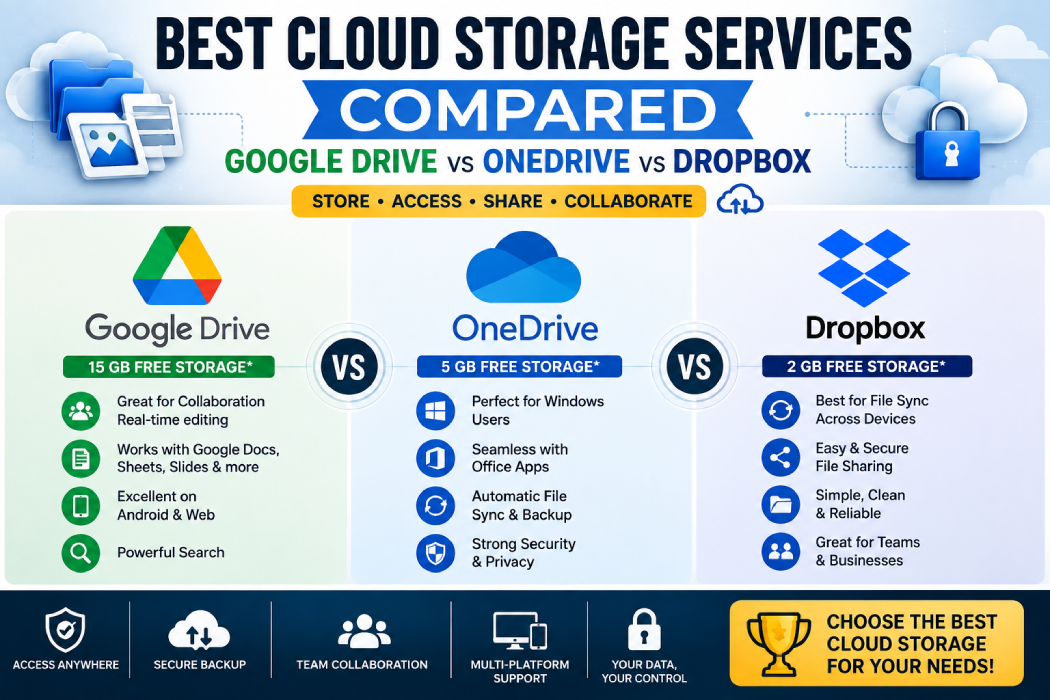
Google provides up to 15 GB of free storage shared across Google Drive, Gmail, and Google Photos. Microsoft offers 5 GB of free OneDrive storage, while Dropbox Basic includes 2 GB of free storage.
1. Google Drive
Google Drive is one of the most widely used cloud storage platforms in the world.
It is deeply integrated with Google’s ecosystem, making it a convenient choice for users who already use Gmail, Google Docs, Google Photos, and Android devices.
Key Features of Google Drive
Google Drive allows users to:
- Store files online
- Share files and folders
- Collaborate in real time
- Create documents
- Create spreadsheets
- Create presentations
- Access files from multiple devices
- Backup photos and files
- Search files quickly
One of its biggest strengths is integration with Google Workspace tools.
Users can easily create and collaborate using:
- Google Docs
- Google Sheets
- Google Slides
- Google Forms
This makes Google Drive especially useful for students, freelancers, bloggers, and remote teams.
Google Drive Free Storage
A standard Google Account includes up to 15 GB of free cloud storage.
However, this storage is shared between:
- Google Drive
- Gmail
- Google Photos
This means large email attachments and photos can reduce the available Drive storage. Google One plans provide additional storage options.
Pros of Google Drive
- Generous free storage
- Excellent collaboration tools
- Easy file sharing
- Works well with Android
- Real-time document editing
- Strong integration with Google services
- Easy for beginners
Cons of Google Drive
- Free storage is shared with Gmail and Google Photos
- Can become confusing when multiple shared files and folders are involved
- Best experience comes from using Google’s ecosystem
2. Microsoft OneDrive
Microsoft OneDrive is Microsoft’s cloud storage service.
It is an excellent option for people who regularly use Windows and Microsoft Office applications.
OneDrive integrates closely with:
- Windows
- Microsoft Word
- Excel
- PowerPoint
- Outlook
- Microsoft 365
For professionals and businesses already working within Microsoft’s ecosystem, OneDrive can be a natural choice.
Key Features of OneDrive
OneDrive provides features such as:
- Cloud file storage
- Automatic photo backup
- File synchronization
- Microsoft Office integration
- File sharing
- Real-time collaboration
- Windows backup options
- Version history
One of OneDrive’s biggest advantages is its deep Windows integration.
Many Windows users can easily sync Desktop, Documents, and Pictures folders with OneDrive.
OneDrive Free Storage
Microsoft currently provides 5 GB of free cloud storage with a Microsoft account.
Paid Microsoft plans can provide additional storage and Microsoft 365 integration.
Pros of OneDrive
- Excellent Windows integration
- Strong Microsoft Office compatibility
- Good for professional work
- Easy file synchronization
- Useful Microsoft 365 ecosystem
- Good cross-device access
Cons of OneDrive
- Less free storage than Google Drive
- Best experience for Microsoft ecosystem users
- Storage can feel limited on the free plan
3. Dropbox
Dropbox is one of the best-known names in cloud storage and file synchronization.
It became popular because of its simple and reliable approach to syncing files across multiple devices.
Dropbox is especially useful for users who frequently work across different operating systems.
Key Features of Dropbox
Dropbox allows users to:
- Store files in the cloud
- Sync files between devices
- Share files and folders
- Create shareable links
- Collaborate on projects
- Backup important folders
- Access files offline and online
Dropbox is known for its straightforward file-sharing experience.
You can easily create a link to a file and share it with another person.
Dropbox Free Storage
Dropbox Basic offers 2 GB of free storage.
The free plan is suitable for basic documents and small files, but users who store large numbers of photos or videos may need more storage.
Pros of Dropbox
- Excellent file synchronization
- Simple file sharing
- Strong cross-platform support
- Easy collaboration
- Reliable backup features
- Clean and simple interface
Cons of Dropbox
- Only 2 GB free storage
- Paid plans may be necessary for heavy users
- Fewer built-in productivity tools compared with Google and Microsoft ecosystems
Google Drive vs OneDrive vs Dropbox: Detailed Comparison
1. Free Storage
For users looking for maximum free storage, Google Drive has a clear advantage.
| Service | Free Storage |
|---|---|
| Google Drive | Up to 15 GB |
| OneDrive | 5 GB |
| Dropbox | 2 GB |
However, Google Drive’s storage is shared with Gmail and Google Photos, so the usable space depends on your overall Google account usage.
Winner: Google Drive 🏆
2. File Synchronization
All three services provide file synchronization between devices.
Dropbox has historically built its reputation around simple and reliable file syncing.
Google Drive and OneDrive also provide strong synchronization capabilities.
Best for File Syncing: Dropbox 🏆
3. Collaboration
Collaboration is important for remote teams, students, freelancers, and businesses.
Google Drive
Google Drive offers excellent real-time collaboration through Google Docs, Sheets, and Slides.
Multiple users can work on the same document simultaneously.
OneDrive
OneDrive works closely with Microsoft Word, Excel, and PowerPoint.
This makes it useful for teams that already use Microsoft 365.
Dropbox
Dropbox offers collaboration and sharing tools but does not have the same native office productivity ecosystem as Google Workspace or Microsoft 365.
Winner: Google Drive and OneDrive 🏆
4. Best for Windows Users
OneDrive has a major advantage for Windows users.
Microsoft integrates OneDrive directly into its ecosystem, making it convenient for syncing files between Windows computers and cloud storage.
Users who regularly work with:
- Word
- Excel
- PowerPoint
- Outlook
may find OneDrive particularly convenient.
Winner: OneDrive 🏆
5. Best for Android Users
Google Drive works especially well with Android devices because of its integration with Google services.
Android users can easily connect Google Drive with:
- Gmail
- Google Photos
- Google Docs
- Google Sheets
- Google ecosystem services
Winner: Google Drive 🏆
6. File Sharing
All three services allow users to share files.
However, Dropbox is particularly known for simple file and folder sharing.
Google Drive also makes sharing easy, especially when working with Google accounts.
OneDrive is a strong choice for Microsoft users.
Winner: Dropbox 🏆
Security and Privacy
Security is one of the most important factors when choosing cloud storage.
All major cloud storage providers offer security features designed to protect user accounts and files.
However, users should also take responsibility for account security.
Basic Cloud Storage Security Tips
Regardless of which service you choose:
- Use a strong password
- Enable two-factor authentication
- Don’t share account passwords
- Review shared folder permissions
- Avoid opening suspicious links
- Remove access for unused devices
- Regularly check important files
Remember that cloud security depends not only on the provider but also on how securely you manage your account.
Which Cloud Storage Is Best for Different Users?
Best for Students: Google Drive
Google Drive is an excellent choice for students.
Reasons include:
- Generous free storage
- Google Docs
- Google Sheets
- Google Slides
- Easy collaboration
- Easy file sharing
Students can create assignments and collaborate without installing additional software.
Winner: Google Drive 🏆
Best for Professionals: OneDrive
Professionals who use Microsoft Office regularly may prefer OneDrive.
It integrates smoothly with Word, Excel, and PowerPoint.
Winner: OneDrive 🏆
Best for Freelancers: Google Drive
Freelancers often need to:
- Share files with clients
- Create documents
- Manage spreadsheets
- Collaborate remotely
Google Drive provides a simple ecosystem for these tasks.
Winner: Google Drive 🏆
Best for File Syncing: Dropbox
If your main priority is syncing files across multiple devices and sharing files quickly, Dropbox remains a strong option.
Winner: Dropbox 🏆
Best Free Option: Google Drive
With up to 15 GB of free storage, Google Drive provides the largest free allocation among these three popular services.
Winner: Google Drive 🏆
Google Drive vs OneDrive vs Dropbox: Who Should Choose What?
Choose Google Drive If:
- You use Gmail regularly
- You have an Android phone
- You need more free storage
- You collaborate using documents
- You use Google Docs and Sheets
- You want an easy-to-use cloud service
Choose OneDrive If:
- You use Windows regularly
- You work with Microsoft Office
- You have a Microsoft 365 subscription
- You use Word, Excel, and PowerPoint daily
- You need integration with Microsoft’s ecosystem
Choose Dropbox If:
- File synchronization is your priority
- You work across multiple platforms
- You frequently share large files
- You prefer a simple cloud storage interface
- You need strong file-sharing workflows
Can You Use More Than One Cloud Storage Service?
Yes.
Many users use multiple cloud storage services for different purposes.
For example:
Google Drive: Documents and personal files
OneDrive: Microsoft Office work
Dropbox: Client file sharing and project synchronization
Using multiple services can help you take advantage of the strengths of each platform.
However, managing files across several cloud services can become confusing, so it’s a good idea to organize folders carefully.
Final Verdict: Which Cloud Storage Service Is Best?
There is no single cloud storage service that is perfect for everyone.
The best choice depends on your existing digital ecosystem.
🥇 Best Overall: Google Drive
Best for most users because of:
- Up to 15 GB free storage
- Excellent collaboration
- Google Workspace integration
- Easy sharing
- Cross-platform support
🥈 Best for Windows & Microsoft Office: OneDrive
Best for users who rely heavily on:
- Windows
- Word
- Excel
- PowerPoint
- Microsoft 365
🥉 Best for File Syncing: Dropbox
Best for users who prioritize:
- Simple synchronization
- File sharing
- Cross-platform workflows
Quick Recommendation
Google Drive → Best for most everyday users
OneDrive → Best for Microsoft and Windows users
Dropbox → Best for file syncing and sharing
Frequently Asked Questions (FAQs)
Which cloud storage gives the most free space?
Among Google Drive, OneDrive, and Dropbox, Google provides the largest standard free allocation with up to 15 GB, compared with OneDrive’s 5 GB and Dropbox Basic’s 2 GB.
Is Google Drive better than OneDrive?
It depends on your needs. Google Drive is excellent for collaboration and Google ecosystem users, while OneDrive is a better fit for people who regularly use Windows and Microsoft Office.
Is Dropbox still worth using?
Yes. Dropbox remains useful for people who prioritize simple file syncing, sharing, and cross-platform access. However, its free storage allocation is smaller than Google Drive and OneDrive.
Which cloud storage is best for business?
The best option depends on the software your team already uses. Google-based teams may prefer Google Drive and Workspace, while Microsoft-focused organizations may prefer OneDrive and Microsoft 365.
Can I use Google Drive, OneDrive and Dropbox together?
Yes. You can use multiple cloud storage services for different purposes, such as keeping personal documents in Google Drive, Microsoft Office files in OneDrive, and client file sharing in Dropbox.
Conclusion
Cloud storage is no longer just about saving files online. The right service can improve productivity, make collaboration easier, and ensure your important documents are accessible from anywhere.
Google Drive, OneDrive, and Dropbox all have their own strengths.
Before choosing one, consider:
- How much storage you need
- Which devices you use
- Whether you collaborate with others
- Which productivity apps you already use
- Whether you need personal or professional storage
For most everyday users, Google Drive is the best all-round choice. For Microsoft users, OneDrive is a natural fit, while Dropbox remains an excellent option for users who value file synchronization and simple sharing.
The best cloud storage service is ultimately the one that fits seamlessly into the way you already work.