

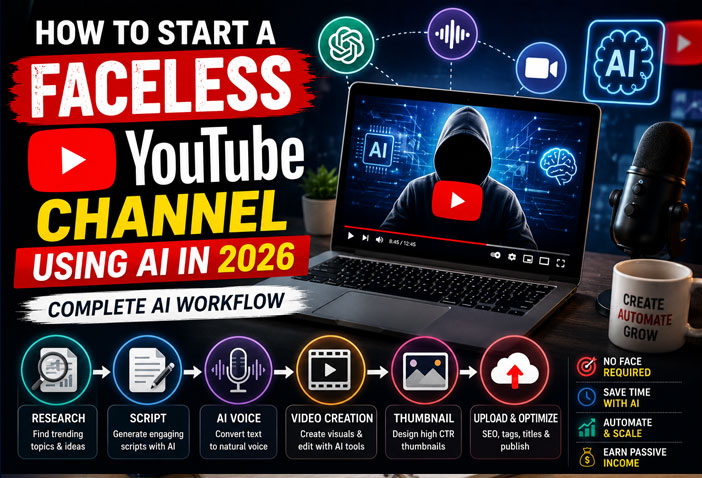
Starting a YouTube channel no longer requires an expensive camera, professional editing skills, or even showing your face. Thanks to AI-powered tools, anyone can create high-quality videos from home with minimal investment.
Faceless YouTube channels are booming in 2026 because they allow creators to produce engaging content faster while maintaining privacy. Whether you’re a student, freelancer, entrepreneur, or someone looking for a side income, AI can automate most of the content creation process.
In this guide, you’ll learn the complete AI workflow for building a successful faceless YouTube channel—from choosing a profitable niche to creating videos, optimizing them for search, and earning revenue.
Why Faceless YouTube Channels Are Growing in 2026
AI has transformed video production. Tasks that once took days can now be completed in hours.
Some of the biggest benefits include:
- No need to appear on camera
- Lower production costs
- Faster content creation
- Consistent publishing schedule
- Easy to scale with AI automation
- Suitable for beginners
Many successful creators now run multiple faceless channels using AI-assisted workflows.
Step 1: Choose a Profitable Niche
The first step is selecting a niche with consistent demand and good monetization potential.
Popular faceless YouTube niches in 2026 include:
- AI Tools & Technology
- Personal Finance
- Business Tips
- Productivity
- Motivation
- History
- True Crime
- Space & Science
- Health & Fitness
- Luxury Lifestyle
- Coding Tutorials
- Book Summaries
- Educational Content
- News & Current Affairs
- Top 10 Videos
Tips for Choosing a Niche
- Pick a topic you enjoy researching.
- Check search demand using YouTube Search and Google Trends.
- Choose evergreen topics that remain relevant over time.
- Consider advertiser-friendly categories for better CPM.
Step 2: Research Video Ideas Using AI
Finding fresh content ideas is one of the biggest challenges for creators. AI tools make this process much easier.
Use AI to:
- Discover trending topics
- Analyze competitors
- Generate video titles
- Find frequently asked questions
- Identify long-tail keywords
For example, instead of creating a generic video about AI, you could target:
- Best AI Tools for Students
- AI Apps That Save Time
- ChatGPT Tips for Beginners
- AI Side Hustles
Specific topics usually perform better in search results.
Step 3: Write High-Quality Scripts
A compelling script keeps viewers engaged and improves watch time.
AI writing tools can generate:
- Video introductions
- Main content
- Storytelling sections
- Calls-to-action
- SEO-friendly titles and descriptions
Simple Script Structure
Hook (0–15 seconds)
Grab attention with a surprising fact or question.
Introduction
Tell viewers what they’ll learn.
Main Content
Break the topic into clear sections with examples.
Summary
Recap the key points.
Call to Action
Encourage viewers to like, comment, and subscribe.
Always review AI-generated scripts to ensure accuracy and add your own insights.
Step 4: Generate AI Voiceovers
If you don’t want to record your own voice, AI voice generators provide realistic narration.
Look for tools that offer:
- Natural-sounding voices
- Multiple accents and languages
- Emotion control
- Custom pacing
- High-quality audio export
Choose a voice that matches your niche. A calm, professional tone works well for educational content, while an energetic voice may suit entertainment channels.
Step 5: Create Visuals Using AI
Visuals are essential for keeping viewers engaged.
You can create:
- AI-generated images
- Motion graphics
- Animations
- Stock video compilations
- Screen recordings
- Infographics
Many AI tools can generate custom visuals from simple text prompts, helping your videos stand out without expensive design software.
Step 6: Edit Videos Faster with AI
Video editing used to require hours of manual work, but AI can automate many repetitive tasks.
Modern AI video editors can:
- Remove silent pauses
- Add subtitles automatically
- Generate transitions
- Match background music
- Improve audio quality
- Resize videos for different platforms
Even beginners can produce professional-looking videos with minimal editing experience.
Step 7: Design Click-Worthy Thumbnails
Your thumbnail often determines whether someone clicks on your video.
Effective thumbnails usually include:
- Bold, readable text
- High contrast colors
- Clear focal point
- Minimal clutter
- Curiosity-driven visuals
AI design tools can generate multiple thumbnail concepts in seconds, making it easy to test different styles.
Step 8: Optimize for YouTube SEO
Uploading a great video isn’t enough—you also need to optimize it for search.
SEO Checklist
- Include your primary keyword in the title.
- Write a detailed video description.
- Add relevant tags.
- Use chapters where appropriate.
- Create custom thumbnails.
- Add end screens and cards.
- Include keywords naturally in your script.
YouTube’s algorithm relies heavily on relevance, engagement, and viewer retention.
Step 9: Publish Consistently
Consistency is one of the biggest factors in YouTube growth.
A good publishing schedule might be:
- 2–3 videos per week for beginners
- 4–5 videos per week as you scale
- Daily uploads if your workflow allows
AI significantly reduces production time, making it easier to maintain a regular schedule.
Step 10: Analyze Performance and Improve
Use YouTube Analytics to understand what works.
Pay attention to:
- Click-Through Rate (CTR)
- Audience Retention
- Average View Duration
- Watch Time
- Subscriber Growth
- Traffic Sources
If viewers leave early, improve your hooks. If CTR is low, experiment with different thumbnails and titles.
Recommended AI Workflow for Faceless YouTube Channels
Here’s a simple workflow you can follow:
| Stage | AI Task | Outcome |
|---|---|---|
| Idea Generation | Research trending topics | High-demand video ideas |
| Script Writing | Generate structured scripts | Engaging content |
| Voiceover | Create AI narration | Professional audio |
| Visuals | Generate images and clips | Attractive visuals |
| Video Editing | Automate editing tasks | Faster production |
| Thumbnail Design | Create multiple concepts | Higher click-through rates |
| SEO Optimization | Optimize title, description, and tags | Better discoverability |
| Analytics | Review performance | Continuous improvement |
Best AI Tools for Faceless YouTube Channels in 2026
Here are some of the most useful AI tools for each stage of the workflow:
| Task | Recommended AI Tools |
|---|---|
| Script Writing | ChatGPT, Claude, Google Gemini |
| Research | Perplexity AI, NotebookLM |
| Voice Generation | ElevenLabs, Murf AI |
| Video Creation | Pika, Runway, InVideo AI |
| Video Editing | CapCut AI, Descript |
| Image Generation | Midjourney, DALL·E, Adobe Firefly |
| Thumbnail Design | Canva AI, Ideogram |
| SEO | TubeBuddy, VidIQ |
You don’t need every tool from day one. Start with a few free options and upgrade as your channel grows.
Common Mistakes to Avoid
Many new creators struggle because they make avoidable mistakes.
Here are some common ones:
- Publishing inconsistent content
- Choosing overly broad topics
- Ignoring audience retention
- Using misleading thumbnails or titles
- Uploading low-quality audio
- Relying entirely on AI without reviewing the output
- Not optimizing videos for search
- Giving up too soon
Remember, YouTube growth often takes time. Consistency and continuous improvement are key.
Monetizing Your Faceless YouTube Channel
Once your channel gains traction, there are several ways to earn income:
- YouTube Partner Program: Earn from ads after meeting eligibility requirements.
- Affiliate Marketing: Recommend products or AI tools and earn commissions.
- Sponsored Videos: Collaborate with brands.
- Digital Products: Sell eBooks, templates, or online courses.
- Memberships: Offer exclusive content to subscribers.
- Consulting or Services: Attract clients through your expertise.
Diversifying your income streams can make your channel more sustainable over the long term.
Future of AI-Powered YouTube Channels
AI is evolving rapidly, and future tools are expected to automate even more of the content creation process. Features like AI-generated B-roll, multilingual dubbing, personalized thumbnails, and advanced audience analytics will make it easier for creators to scale their channels.
However, originality and authenticity will remain important. Successful creators will use AI as a productivity tool while adding their own creativity, expertise, and unique perspective.
Final Thoughts
Starting a faceless YouTube channel in 2026 has never been more accessible. With the help of AI, you can handle research, script writing, voiceovers, visuals, editing, and SEO more efficiently than ever before.
The key to long-term success isn’t just using AI—it’s creating valuable content consistently and understanding what your audience wants. Focus on solving problems, delivering engaging videos, and improving with every upload.
If you combine AI-powered efficiency with your own ideas and insights, you can build a channel that grows steadily and generates income over time.
Frequently Asked Questions (FAQs)
Can I start a YouTube channel without showing my face?
Yes. Many successful creators run faceless channels using AI-generated voiceovers, animations, stock footage, and custom visuals.
Is AI-generated content allowed on YouTube?
Yes, as long as your content follows YouTube’s policies, provides value, and does not violate copyright or spam guidelines.
How much does it cost to start a faceless YouTube channel?
You can start with free AI tools and a basic editing app. As your channel grows, you may choose to invest in premium tools for better efficiency and quality.
Which niche is best for faceless YouTube channels?
Evergreen niches such as AI, technology, personal finance, education, productivity, history, and health tend to perform well over time.
Can I monetize AI-created videos?
Yes. AI-assisted videos can be monetized if they comply with YouTube’s monetization policies and include original, valuable content rather than repetitive or low-effort material.