

Introduction
Imagine finishing your daily work in half the time without writing a single line of code. Thanks to artificial intelligence (AI), that’s now possible for professionals, freelancers, students, and business owners alike.
Modern AI tools can automate repetitive tasks such as writing emails, scheduling meetings, summarizing documents, creating reports, managing projects, and even generating social media content. The best part? You don’t need any programming skills to use them.
In this guide, you’ll learn how to automate daily work using AI (no coding required) and discover the best tools that can save you hours every week.
What Is AI Automation?
AI automation means using artificial intelligence to complete repetitive or time-consuming tasks automatically.
Instead of manually performing the same activities every day, AI tools can:
- Write emails
- Summarize meetings
- Create documents
- Schedule tasks
- Organize files
- Generate reports
- Create social media posts
- Answer customer queries
This helps improve productivity while reducing manual effort.
Why Use AI to Automate Daily Work?
Whether you’re an employee, entrepreneur, content creator, or student, AI automation offers several benefits:
- Save 5–10 hours every week
- Reduce repetitive work
- Improve accuracy
- Increase productivity
- Focus on high-value tasks
- Minimize human errors
- Work more efficiently without technical skills
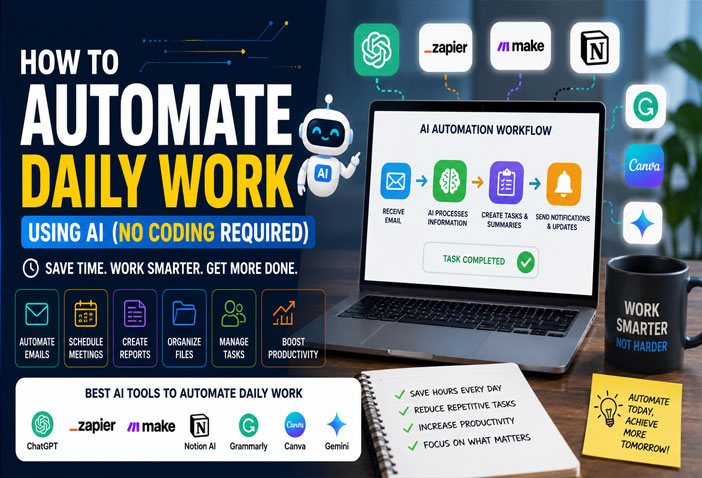
Best AI Tools for Daily Work Automation
1. ChatGPT
Best For: Writing, brainstorming, research, and content creation.
What You Can Automate
- Emails
- Reports
- Blog posts
- Meeting summaries
- Job descriptions
- Excel formulas
- Customer replies
Why Use It?
ChatGPT acts like a personal AI assistant that can complete writing and research tasks in minutes.
2. Zapier AI
Best For: Connecting apps without coding.
Automate
- Gmail → Google Sheets
- Form submissions
- Slack notifications
- CRM updates
- Calendar events
Perfect for businesses using multiple apps.
3. Make.com
Best For: Advanced workflow automation.
Examples
- Save email attachments automatically
- Sync databases
- Generate invoices
- Update spreadsheets
- Connect hundreds of applications
4. Notion AI
Best For: Notes and project management.
Features
- Summarize notes
- Generate documents
- Organize tasks
- Create meeting minutes
- Build knowledge bases
5. Grammarly AI
Best For: Writing professional emails and documents.
Automate
- Grammar correction
- Tone improvement
- Email drafting
- Content rewriting
6. Canva AI
Best For: Graphic design automation.
Create
- Social media posts
- Presentations
- Blog banners
- Marketing graphics
- YouTube thumbnails
7. Google Gemini
Best For: Google Workspace users.
Automate
- Gmail replies
- Google Docs writing
- Spreadsheet analysis
- Meeting summaries
- Document generation
Daily Tasks You Can Automate Using AI
Email Management
AI can:
- Draft emails
- Reply automatically
- Improve writing
- Summarize long conversations
Meeting Notes
Instead of taking notes manually, AI tools can:
- Record meetings
- Create summaries
- Generate action items
- Share meeting notes automatically
Content Creation
AI can generate:
- Blog articles
- Social media captions
- Product descriptions
- SEO titles
- Meta descriptions
Project Management
AI helps by:
- Creating task lists
- Assigning priorities
- Tracking deadlines
- Sending reminders
Data Entry
Instead of manual copying, AI workflows can automatically:
- Transfer form data
- Update spreadsheets
- Sync CRMs
- Generate reports
Real-Life Example
Imagine you receive a customer inquiry through a website form.
Without AI:
- Read email
- Write response
- Update CRM
- Notify sales team
- Create follow-up task
Time: 15–20 minutes
With AI automation:
- Customer inquiry received
- AI drafts the reply
- CRM updated automatically
- Sales team notified instantly
- Follow-up task created
Time: Less than 2 minutes
Tips for Successful AI Automation
- Start with one repetitive task
- Choose user-friendly AI tools
- Review AI-generated outputs
- Protect sensitive information
- Test workflows before using them daily
- Continuously optimize your automations
Are No-Code AI Tools Safe?
Most reputable AI platforms provide:
- Secure cloud storage
- Data encryption
- Access controls
- Compliance with privacy standards
Always review a tool’s privacy policy before uploading confidential information.
Final Thoughts
AI automation is no longer just for developers or large enterprises. Today, anyone can automate daily work using powerful no-code AI tools.
Whether you’re writing emails with ChatGPT, designing graphics in Canva AI, organizing projects in Notion AI, or connecting apps with Zapier and Make.com, AI can save hours every week while helping you work smarter.
Start by automating one repetitive task today. As you become comfortable, you can expand your workflows and unlock even greater productivity—all without writing a single line of code.
FAQs
Can I automate work without coding?
Yes. Many AI tools offer drag-and-drop interfaces and ready-made templates, making automation accessible without programming knowledge.
Which AI tool is best for beginners?
ChatGPT, Canva AI, and Notion AI are beginner-friendly options for writing, design, and organization.
Is AI automation free?
Most tools provide free plans with basic features. Advanced capabilities usually require paid subscriptions.
Can AI automate emails?
Yes. AI can draft, summarize, categorize, and even suggest responses to emails.
How much time can AI automation save?
Depending on your workflow, AI can save anywhere from 5 to 15 hours per week by handling repetitive tasks.